> For the complete documentation index, see [llms.txt](https://docs.novacura.com/flow-connect/llms.txt). Markdown versions of documentation pages are available by appending `.md` to page URLs; this page is available as [Markdown](https://docs.novacura.com/flow-connect/working-with-connect/connect-to-systems/connectors/odbc.md).
# ODBC
Use the ODBC connector to enable database connectivity through Open Database Connectivity (ODBC) drivers.
As of January 2026, the connector supports the following latest versions: PostgreSQL 16.0 (x64), MariaDB ODBC Driver 3.2, and MySQL ODBC Driver 9.5. Official support is limited to these tested versions. While other ODBC data sources may be compatible, they have not been validated and are not covered by Novacura support.
The ODBC connector supports **64-bit drivers only**.
## Prerequisite
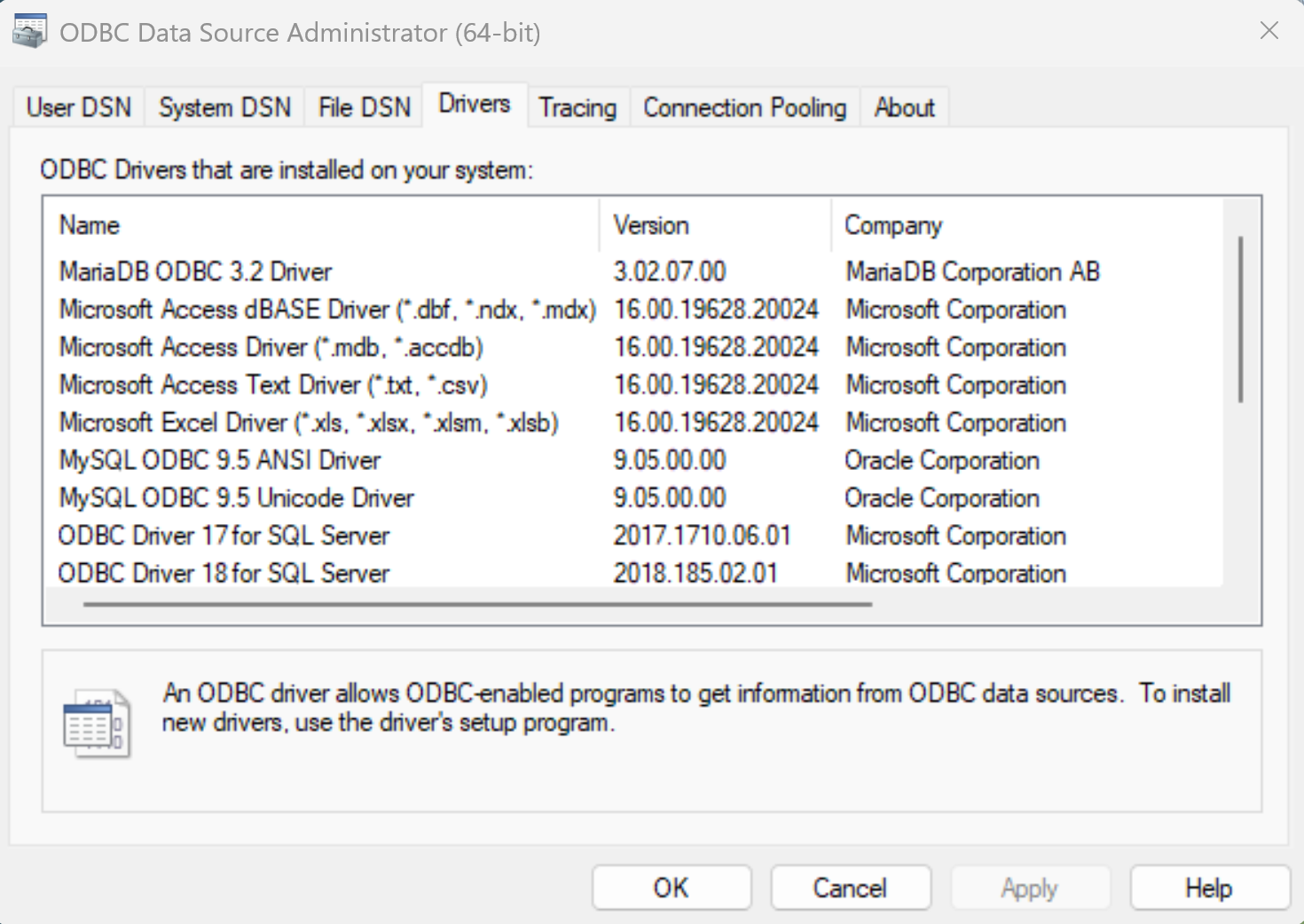
As a prerequisite, the user must install the appropriate ODBC driver for the target data source. Once installed, the driver will be listed under the **Drivers** section of the ODBC Data Source Administrator.
If the user plans to connect to the database using a **DSN**, refer to the following documentation for guidance on creating and managing ODBC data sources: [Microsoft documentation: Administer ODBC data sources.](https://support.microsoft.com/en-us/office/administer-odbc-data-sources-b19f856b-5b9b-48c9-8b93-07484bfab5a7)
## Managing Connector : Add, Edit, or Delete
Follow the [steps in the link](https://docs.novacura.com/flow-connect/working-with-connect/connect-to-systems/managing-connector) as a guideline for connector actions: Add, Edit, and Delete.
## Configuration values
| Configuration | Description |
| -------------------------------- | ---------------------------------------------------------------------------------------------------------------------------------------------------------------------------------------------------------------------------------------------------------------------------------------------------------------------------------------------------------------------------------------------------------------------------------------------------------------- |
| **Agent Group** | Specifies the agent group on which the connector will be executed. |
| **Driver Name** | Specifies the ODBC driver to be used for establishing the database connection. |
| **Hostname / Server Address** | Specifies the hostname or IP address of the database server. |
| **Port** | Specifies the port number on which the database server is listening. |
| **Database Name** | Specifies the name of the database to connect to. |
| **Username** | Specifies the username used to authenticate with the database. |
| **Password** | Specifies the password associated with the provided username. |
| **Connection Timeout** | Specifies the timeout, in seconds, for establishing a connection to the database via the ODBC connector. |
| **Additional Properties** | Allows specifying extra connection properties required by the database driver, (such as `MULTI_STATEMENTS=1` for MySQL) |
| **Command Timeout** | Command timeout, in seconds, to use when executing a script or a query. If not set, the default value (90 seconds) will be used. |
| **Override Connection String** | Specifies a Connection string that overrides the default or configured connection settings. DSN values are also supported in place of the connection string. |
| **Treat DATE as STRING** | By default, a database `DATE` is mapped to `DATETIME` in Flow; this option allows them to be returned as `STRING` values instead. |
| **Time Zone** |
Defines the time zone used for interpreting and returning date and time values. See below for more information.
Default - Uses the agent’s time zone: The user can keep the time zone set to the agent’s time zone.
|
| **Date/Time Parameter Behavior** |
Controls how date and time input parameters are processed and converted during execution. See below for more information.
Default - Pass through : Keeps the date and time values unchanged, without applying any time zone conversion.
Convert to configured time zone :
Converts the date and time values to the time zone specified in the configuration before returning them.
|
**Note :**
If the user database and the agent installation are in the same time zone, **Pass-through is required** to ensure correct date and time handling.
If they are in different time zones, the user should use **Convert to configured time zone**, so that the date values adhere to the database’s installed time zone.
When a user writes data to the database (for example, using an `INSERT` query), the datetime value is stored in **UTC**, regardless of whether **Pass-through** or **Convert to configured time zone** is used.
When fetching data (for example, using a `SELECT` query):
* If **Pass-through** is selected in the configuration, the datetime is returned using the **Agent’s time zone** **(which represents the user’s local time)**..
* If **Convert to configured time zone** is selected, the datetime is converted to the **time zone specified in the configuration**.
## Operations
Users can perform common database operations with the ODBC connector for PostgreSQL, MySQL, and MariaDB, including Single Record Query, Multi Record Query, Script Query as well as sign operations.
**Note :**
**Date and Time Type Mapping**
When working with database date and time values in Flow, the following type mappings are applied:
* **Database `DATETIME`** → Mapped to **`DATETIME`** in Flow
* **Database `TIMESTAMP` / `TIMESTAMP WITH TIME ZONE`** → Mapped to **`DATETIME`** in Flow
* **Database `DATE`** → Mapped to **`DATETIME`** in Flow in Flow by default, and to `STRING` when the **Treat DATE as STRING** configuration is enabled.
* **Database `TIME`** → Mapped to **`STRING`** in Flow
#### **Special Notes for MariaDB**
* When date/time values are passed as strings (for example, `'2026-01-25 10:00:00'`), no transformation is applied at the database level.
* When database built-in date/time functions are used, the resulting values are normalized to the database server’s configured time zone.
* When retrieving data, date/time values are transformed according to the **Date/Time Parameter Behavior** value.
**Storing FlowScript DateTime Values**
To store FlowScript `DateTime` values in MariaDB, it is recommended to first convert them to UTC and remove the time zone offset. Use the following expression to convert and format the value before saving:
`str(DateTime.toUTC()).replace("+00:00", "")`
If **DateTimeInputParameterBehavior** is set to **Pass-through**, converting `DateTime` values to UTC before saving is not required, as no conversion will be applied when retrieving the data. In this case, you may use:
`str(DateTime).replace("+XX:XX", "")`
(where `XX:XX` represents the local time zone offset).
However, if **Date/Time Parameter Behavior** is set to **Convert to configured time zone**, it is recommended to convert the `DateTime` value to UTC before saving to ensure consistent and predictable results.
---
# Agent Instructions
This documentation is published with GitBook. GitBook is the documentation platform designed so that both humans and AI agents can read, navigate, and reason over technical content effectively. Learn more at gitbook.com.
## Querying This Documentation
If you need additional information that is not directly available in this page, you can query the documentation by asking a question.
Perform an HTTP GET request on the following URL with the `ask` and `goal` query parameters:
```
GET https://docs.novacura.com/flow-connect/working-with-connect/connect-to-systems/connectors/odbc.md?ask=&goal=
```
`ask` is the immediate question: it should be specific, self-contained, and written in natural language.
`goal` is what the user is ultimately trying to achieve, the reason they need the answer. Sharing it helps GitBook give you a better, more relevant answer. A goal is most helpful when it describes the outcome the user wants rather than restating the question. For example, with `ask=how do I create an API token`, a goal like `automate deployments from our CI pipeline` lets GitBook tailor the answer to that use case.
The response will contain a direct answer to the question and relevant excerpts and sources from the documentation.
Use this mechanism when the answer is not explicitly present in the current page, you need clarification or additional context, or you want to retrieve related documentation sections.